Changelog
Everything we ship, as we ship it — often several times a day. Times are UTC.
1 November 2026
- NewDeleted files go to a 30-day trash, with their history and comments
Deleting a file or folder no longer makes it vanish. It waits in the project's trash (under the ⋮ menu above the file tree) for 30 days, with its full edit history and comments, and anyone with edit access can restore it. There's an Undo right after you delete, and AI apps connected to Samskrift can list and restore deleted files too.
- NewSee and disconnect the AI apps connected to your account
Account → Settings now lists every AI app you've approved (Claude, ChatGPT, Claude Code…), with a Disconnect button that ends its access right away. The projects page shows a small card on how to connect one, until you do or close it.
- ImprovedConnecting an AI app is clearer when you're new
The sign-in page now says when an AI app is waiting to connect, and if the 10-minute connection request runs out while you create your account, the page explains how to finish in two clicks instead of showing an error.
- FixedThe editor no longer jumps to the top when you come back to the tab
Switching to another window and back could rebuild the editor and lose your place. It now stays put, and switching between files remembers where you were in each.
25 October 2026
- NewTable editor: merge cells, colours, borders exactly where you want them, and Excel files
Select cells and merge them, make text bold, italic or coloured, fill cells, and draw single or double borders on any edge. Paste from Excel, Google Sheets, Word or Docs and merged cells, bold and colours come along, or open an .xlsx, CSV or Markdown file. New options for long tables that run across pages, landscape pages, fitting the page width and font size; the preview shows it all on paper, and the code can also be copied as Markdown, CSV or HTML. It's the same editor in the free table generator and in your projects, where inserting a table now adds every package it needs.
- ImprovedSymbol finder: the drawing pad sits next to the search, and categories filter in place in a bar that stays on screen
- ImprovedEquation editor: edit formulas visually, like on a calculator, in sync with the LaTeX; the preview is readable in dark mode
- NewFree LaTeX tools, no account needed: table generator, symbol finder, equation editor and cheat sheet
Build tables in a grid or paste them from Excel, find any of 1,000+ symbols by name or by drawing it, write equations with a live preview and save them as SVG or PNG, or keep the two-page cheat sheet handy. Each one hands you code to paste anywhere, or opens it as a new project. Find them under Tools at samskrift.com/tools.
- NewFour new templates: Jake's Resume, a cover letter, an academic CV and an exam with an answer key
- NewSamskrift is now in the Claude Connectors Directory
Connect Claude from claude.ai/directory/samskrift (or search “Samskrift” under Customize → Connectors), click Connect and approve. Adding the link as a custom connector still works as a fallback.
- FixedAI assistants connected to Samskrift now get the full result from every tool (e.g. chat messages and old file versions), not just a summary count
- FixedThe Connect page's Claude steps now match Claude's current menus (Customize → Connectors)
- ImprovedAI assistants ask before changing things, and the sign-in screen shows where you're sent
Every tool a connected assistant (Claude, ChatGPT, Cursor…) can call now does exactly one thing, so reading never shares a tool with changing: history, comments, labels and share links each got separate read and change tools. Assistants can run the read-only ones freely and ask you before anything that edits, posts, invites or turns off a link. The connection approval screen now shows which account you're signed in as and where approving sends you, with a warning when the app runs on your own computer.
19 October 2026
- ImprovedAI suggestions: Try again and Ask for a change, right on the suggestion
The bar under an inline AI suggestion now has ↻ Try again (a different version of the same request) and an "Ask for a change…" box ("shorter", "keep the citation") that revises the suggestion in place — no need to start over. The AI also sees which packages and macros your document loads, so it stops suggesting code that needs packages you don't have, and if a suggestion still looks like it would break the build (an unclosed brace or environment, aligned outside math, a bare %), the bar tells you before you accept.
- ImprovedTry to fix succeeds more often, and the AI features got faster and cheaper
We rebuilt our AI test suite around real failed fixes (pasted chatbot Markdown, broken math, missing macros, errors deep in long files) and re-benchmarked every model. Try to fix no longer gives up when the AI's explanation contains LaTeX, sees the right part of long files, and switches to a stronger model when a round makes no progress. Rewrites, Image-to-LaTeX and Try to fix now run on newer models that passed every test at about half the cost.
15 October 2026
- NewSamskrift is now listed in the official MCP Registry (com.samskrift/samskrift), so MCP clients and agent directories can find it without a manual setup guide.
- NewNew page for AI agents: samskrift.com/agents shows how Claude, ChatGPT, Codex and other agents can write, compile and share LaTeX in Samskrift.
Agents that read the web can now get every main page as clean text (add .md to the address, or ask for markdown), and AI tools that look for connectable services can find Samskrift's MCP server on their own. The home page, features and setup guide link to it, and the features list is up to date: the template gallery is live, and “Try to fix” shows its changes for review before applying them.
11 October 2026
- ImprovedThe home page now says what “Samskrift” means (Swedish for writing together) and shows a few popular templates to start from.
The FAQ also answers “What is Samskrift?” — all part of helping search engines recognise Samskrift as its own name.
- FixedAI assistants connected to Samskrift no longer get stuck reconnecting in the background every few seconds.
10 October 2026
- ImprovedShared links now show a proper preview card in chats and social media.
Invite links, view-only links, shared templates, the template gallery and every template page each get their own preview image when pasted into Slack, WhatsApp, LinkedIn, X or iMessage — instead of an old screenshot of the home page.
- ImprovedNo more compile-server pause when its machine is replaced.
The compile engine runs on machines that are replaced every few hours. It used to shut the old one down before the new one had started, so a compile at that moment waited about 30 seconds ("starting up"), and a busy machine could even be cut off mid-build. The replacement now starts an hour ahead and takes over only once it's ready, while the old machine finishes the builds it already has. The very first compile of a project on a fresh machine can still take a few extra seconds while its caches fill.
9 October 2026
- ImprovedTry to fix now shows you the fix before touching your document.
The fix agent used to edit the shared document live while it worked — collaborators saw text jump, and a failed run had to undo itself. It now works on a private copy: it analyzes the errors, edits the copy, test-compiles it (up to three rounds), and then shows a per-file diff in the log view with Apply and Discard. Nothing in your project changes until you press Apply, which writes the edits, recompiles, and posts the usual summary with a Revert button in the chat. If the copy still fails but the original error is gone, you get the same review as a "partial fix" and decide yourself. Stopping a run or discarding a proposal leaves everything exactly as it was.
- FixedCompile-server cold starts no longer look like failures.
When the compile engine's machine was still booting (it rotates every few hours), a compile came back after about 30 seconds with a generic "our compile server did not respond" error — and even offered Try to fix on it. The editor now recognises the "starting up" answer, shows an honest status with a countdown, and retries by itself for up to a few minutes while the machine boots. Infrastructure hiccups are shown as their own card with a Try again button, never as LaTeX errors, and the fix agent stays out of them. Compiles started from AI assistants wait through a cold start the same way.
7 October 2026
- ImprovedConnect page: the ChatGPT steps now follow ChatGPT's current Plugins flow (Plugins → + → Add custom MCP server → Create as a plugin), and every AI tool carries accurate read-only / destructive labels so assistants ask before overwriting, deleting or posting.
24 September 2026
- FixedAccount deletion, tested end to end on the live site: you now land on the start page afterwards (not the login page), and read-markers and compile records left in other people's projects are detached the moment the account goes.
17 September 2026
- ImprovedBackup compile services are now opt-in, and nothing you load comes from a third-party CDN anymore.
Compiles only ever go to our own compile server. If it is down you now get a clear message instead of your files quietly being sent to a public LaTeX service; if you would rather have that safety net, turn on "Backup compile services" under Account → Settings (the compile log says so every time it is used). Web fonts and all 27 spell-check dictionaries are now served from samskrift.com itself instead of Google Fonts and jsDelivr. The privacy page gained concrete retention periods (enforced by a nightly cleanup), the legal basis for transfers outside the EU, a minimum age of 13, and no longer lists our names.
- NewDelete your account yourself from Account → Settings.
No more asking us. The dialog shows exactly what goes (the projects you own, with a warning when collaborators would lose access; templates; your memberships elsewhere), asks you to type a confirmation phrase, and then removes everything immediately, files and cached PDFs included. The privacy page now also spells out where compiles run (short-lived sandbox machines, not guaranteed to be in the EU) while storage stays in Ireland.
- NewPrivacy & terms page at samskrift.com/privacy.
A plain-language account of what Samskrift stores, where it lives (EU), who can see your work, which services process it (our compile server, the AI model providers, sign-in), and how to get things deleted. Linked from the footer of every page.
- Improved"Try to fix" now undoes its own edits when it fails to make progress.
If the agent's attempts leave the original error in place, it puts every line it touched back exactly as it was (only where nobody else edited in the meantime), shows the original error again, and says so in the chat. The agent also diagnoses the first real error before editing and is more careful around tables (it no longer deletes & or \\ to silence "Extra alignment tab" errors, adding \arraybackslash where needed instead).
15 September 2026
- FixedThe equation preview no longer dumps red source code when it hits something it can't render (like a shaded \columncolor table). Arrays with colortbl, @{} or p{} column specs now preview as plain tables; while you're mid-edit the last good render stays, dimmed, and truly unrenderable equations get a short note instead.
1 September 2026
- FixedFixed garbled math symbols and missing å/ä/ö in the PDF preview on Chrome.
A build issue silently dropped a browser-compatibility shim from the published PDF renderer, so Chrome could fail to decode a document's embedded fonts and drew stray letters instead ("Z" for an integral sign, "p" for a square root). The shim now always ships and covers more browser versions. Compiled and downloaded PDFs were always correct — only the on-screen preview was affected.
17 August 2026
- FixedThe PDF preview now detects when your browser fails to load a document's fonts (math showing as stray letters, like "Z" instead of an integral sign) and automatically re-renders with built-in vector glyphs — no browser restart needed. The compiled PDF itself was never affected.
14 August 2026
- ImprovedAI actions that reuse context now cost fewer AI credits — input the model has already seen (like earlier rounds of Try to fix) is counted at its much lower cached price.
12 August 2026
- ImprovedThe AI writing assistant is now on by default for new accounts — you can still turn it off anytime in account settings.
10 August 2026
- ImprovedSmarter, faster AI for inline edits and Try to fix.
We benchmarked candidate models on real LaTeX tasks (rewrites that must preserve \"o-style escapes, broken-build repairs, table transcription) and switched both features to the winner. Try to fix in particular now succeeds more often on first try — especially in documents using LaTeX accent escapes — and responses come back noticeably faster.
9 August 2026
- ImprovedSpell check now understands much more LaTeX syntax.
Beyond the recent [htbp] fix: tabular column specs like {lcr}, \verb and \lstinline contents, \href URLs, biblatex citation keys (\parencite, \textcite, …), starred forms like \vspace*, and options for \hypersetup, \lstset, \geometry and friends are no longer flagged as misspelled words.
8 August 2026
- ImprovedThe full compile log is now available after every build — not just failed ones.
Open the Logs view after a successful compile to read the raw transcript, and download the PDF and .log output files from the new Output files section at the bottom.
- NewDocument checks in the Logs view: broken \cite and \ref keys across the whole project.
Undefined citations and references are found live — before compiling — in every file, not just the one you have open. Click a check to jump straight to the spot.
- NewNew \s Edit button in the editor toolbar.
Draft new text at the cursor or rewrite a selection without having to know the ⌘K shortcut first.
- FixedFloat placement specifiers like [htbp] are no longer flagged as spelling mistakes.
- NewPublic template gallery at samskrift.com/templates.
Eleven ready-to-use templates — CV, thesis, IEEE paper, Beamer slides, poster, and more — each with real compiled previews. Open any of them straight into a new project.
- ImprovedSharper page titles and richer link previews across the site.
- NewInline commenting: select text and start a thread right in the editor.
The selection pill now has a comment button next to Rewrite (or press ⌘⇧M / Ctrl+Shift+M — works for every collaborator, no AI needed). Comment threads open as floating bubbles anchored to the highlighted text, where you can reply and resolve without leaving your place, and lines with comments get a small speech-bubble marker beside the line numbers.
5 August 2026
- ImprovedThe equation preview can now be switched on or off from Account settings too, not just the command palette.
- NewLive equation preview in the code editor.
Put your cursor inside any math — $…$, \[…\], or environments like align and gather — and a small bubble above the equation shows the rendered result live as you type. The ⋮ menu in the bubble hides it; re-enable anytime from the command palette (“equation preview”).
- FixedPinch-zooming the PDF preview no longer makes the page jump or recenter when you release — the view now lands exactly where the gesture left it, on both trackpad and touch.
- ImprovedAccount settings now shows how to connect AI tools: a “Connect AI tools (MCP)” section with your MCP link, one-click copy, and a pointer to the step-by-step guides for Claude, ChatGPT, Claude Code, and more.
4 August 2026
- ImprovedProject table now adapts to its actual width, not the window: columns and row actions collapse based on the space the table really has (so the sidebar no longer squeezes it), long titles truncate with a hover tooltip instead of wrapping, shared projects show their owner under the title when the Owner column is hidden, and “last modified” sits on two tidy lines that never wrap.
- FixedThe FAQ and Connect-AI pages could fail to load. Fixed.
- ImprovedProject list: one more row action stays visible at each window width before folding into the “…” menu.
- ImprovedProject list: row actions now collapse into the “…” menu one at a time as the window narrows, instead of all at once.
- FixedProject list: the row action buttons no longer get cut off on the right at narrower window widths.
- ImprovedTidied the Features page — removed the cards that duplicated what the live demos already show.
2 August 2026
- NewWatch the MCP server work inside an AI chat
A new looping demo on the Features page shows an AI assistant you already use calling Samskrift's MCP tools — reading a file, editing it, and recompiling the project. No new AI tool to learn: Samskrift comes to the places you already work.
- ImprovedThe inline AI editing demo now edits a TikZ figure
It mirrors the real Edit-figure flow: one click on the pill selects the whole tikzpicture, and the requested change lands as an inline diff you accept or reject.
- FixedFeature demos no longer spill past the screen edge on phones
- ImprovedFeature demos now look exactly like the real product
The looping demos on the Features page were rebuilt as faithful miniatures of the actual Samskrift UI — the real editor chrome, syntax colors, table dialog, symbol palette, review panel, and AI diff styling. A sixth demo shows Image-to-Tex turning a pasted screenshot into working LaTeX.
- NewLive animated demos on the Features page
The features page now shows small looping demos of the product in action: real-time collaboration, the visual table editor, draw-to-find symbols, commenting, and inline AI editing with diffs. They're drawn live in the page, so they stay crisp on any screen and match light and dark mode.
- ImprovedSimplified the site footer tagline
1 August 2026
- FixedOffline edits now reach online collaborators instantly on reconnect
Previously, when you edited offline and came back online, you'd receive your collaborators' work — but anyone who stayed online wouldn't see your offline edits until they reloaded the page. The reconnect sync is now two-way, so your offline work appears for everyone the moment you're back.
- ImprovedPolished About page copy
Refined the story of why Samskrift exists — emphasizing our commitment to keeping it free and accessible for students and teachers who need high-performance collaborative LaTeX.
- NewAbout page and a feedback form
samskrift.com/about tells the story of why Samskrift exists — built by two engineers who spend their summers teaching at math camps. It includes a feedback form (no account needed): tell us what to build next.
- ImprovedLighter heading weight — headings now use bold instead of extra-black type.
- ImprovedEasier to find the AI agent setup guide
The features page now links to the Connect AI guide from the AI section and the MCP server row, and the FAQ answers a new question: “Does my AI agent work in Samskrift?”
- ImprovedA refreshed favicon
The browser-tab icon shows a little more of the s — a subtle rebalance of the \s mark.
- ImprovedTool logos, Codex setup, and a full tool reference on the connect page
The AI assistant guide at samskrift.com/connect now shows the official Claude, Claude Code, ChatGPT, and Codex logos (in monochrome, matching the theme), adds step-by-step instructions for connecting OpenAI's Codex CLI, and gains a collapsible reference of all 21 tools connected agents can call — including the parameters each one takes.
- NewConnect Claude, ChatGPT, and other AI assistants
Samskrift now speaks MCP: point Claude, Claude Code, ChatGPT, or any MCP-capable tool at samskrift.com/mcp and it can list your projects, read and edit files, compile, browse history, and join the project chat — signed in as you, with every change in version history. Step-by-step setup lives on the new samskrift.com/connect page.
- ImprovedDaily AI allowance is now 1,000 credits
The free daily allowance changes from 2,000 to 1,000 AI credits per day — still plenty for a full day of rewrites, fixes, and snips. Bonus credits work as before and kick in automatically when the daily allowance runs out.
- FixedSharper link previews
The social share card is now exactly 1200×630 and link previews include the site name, so pasting samskrift.com into chats and social apps renders crisply everywhere.
- ImprovedSort the dashboard, and see exact timestamps
Click the Title or Last modified column headers to sort your projects (your choice is remembered), and hover any relative time like “3 hours ago” to see the full date and time.
- ImprovedCitation search moved into the formatting tray
- NewBonus AI credits
Accounts can now hold bonus AI credits on top of the daily 2,000-credit allowance — the daily allowance is always used first, and any bonus balance shows up in Account settings.
- ImprovedThe dashboard shows who last modified each project
The “Last modified” column now reads like “14 hours ago by Alice” — handy for shared projects. Existing projects are filled in from their edit history.
- NewDraft mode: fast preview builds for big projects
Under the Recompile arrow you'll find "Draft mode (fast preview)": it compiles with LaTeX's draft class option, so images become placeholder boxes and heavy packages skip expensive work — multi-minute builds often finish in a fraction of the time. A Draft badge in the toolbar reminds you it's on (click it to turn off), and draft builds never replace your stored full-quality PDF.
- ImprovedA calmer compile status strip
One status line instead of two spinners: while a build runs, the strip rotates through short messages ("Still working…", "Big projects take a bit longer…", plus a Draft-mode tip) next to an elapsed clock, and ends with a brief "Completed in m:ss". The per-project time estimate is gone — cached and cold builds differ so much that it was often wrong.
- ImprovedRecompiling an unchanged document is now instant
When nothing changed since the last build, the compile service simply confirms your PDF is current instead of re-sending it — no multi-megabyte download for a no-op recompile, including the automatic compile right after reopening a project.
- ImprovedLong compiles show progress and a rough time estimate
Big projects can legitimately take minutes to build. While compiling you now see a status strip with escalating messages ("still working…", "this looks like a big project…"), an elapsed-time clock, and — once a project has compiled successfully — a "usually takes ~2 min" estimate with a progress bar.
- NewWrong-compiler errors now come with a one-click fix
Documents that use fontspec, polyglossia or Lua code fail under pdfLaTeX with a cryptic fatal error. The error log now recognizes these failures, explains what's wrong, and offers a "Switch to XeLaTeX and recompile" button. ZIP imports also pick the right engine automatically by reading magic comments and the packages your document loads.
- ImprovedStopping the fix agent is safer
If you stop the "Try to fix" agent after it already edited files, it now posts a summary of exactly what it changed in the project chat with a Revert button, and the stop notification gets a Revert action too — no more silently kept changes.
- ImprovedThe file tree remembers which folders you collapsed
Fold away chapters/ or figures/ and the tree looks the same when you come back: collapsed folders are now remembered per project on your device. New folders still start expanded.
- NewFailed compiles now show a best-effort PDF
When a build has errors, you now still get the partial PDF the compiler managed to produce, shown alongside the error log, so you can see how far the document got instead of staring at an old preview. Works in the editor, on shared view links, and via MCP.
- ImprovedZIP imports are faster and far more reliable
Imports now upload in parallel batches with automatic retries, finish large projects in a fraction of the time, warn you before you close the tab mid-import, and tell you exactly which files (if any) could not be imported instead of dropping them silently.
- FixedFilenames with å, ä, ö and other special letters upload correctly
Images like överkropp.png were silently skipped during upload and ZIP import. They now import fine and keep their original names in the file tree.
- ImprovedMuch faster recompiles for image-heavy projects
The compiler now fetches your images straight from project storage instead of your browser re-uploading them on every compile, and only sends files the build server does not already have.
31 July 2026
- FixedWarning headings in the compile log are readable in dark mode again
- FixedImage-heavy projects no longer get wrongly rejected as too large
Binary assets were being measured with ~33% upload-encoding overhead, so projects well under the size limit could hit "Project too large to compile". Sizes are now measured on the real file bytes, the limit is raised to 100 MB, and the error now tells you your project's size and its largest files.
- ImprovedTab now works with autocomplete
Tab accepts the highlighted suggestion when the autocomplete popup is open, and opens it when your cursor is right after a \command or word. Elsewhere it still indents.
- FixedA new social share card: the real \samskrift wordmark and a side-by-side editor preview, properly balanced.
- ImprovedConfirmations are now proper dialogs instead of browser popups
Deleting projects, files, labels, and templates, restoring history, reverting an AI fix, removing collaborators, and transferring ownership now ask in a styled in-app dialog with clear buttons, instead of the browser's native popup.
- FixedStale compile markers no longer point at the wrong lines
Error and warning indicators in the editor now disappear as soon as a file is edited after a compile, instead of drifting onto the wrong rows. They come back, refreshed, with the next compile.
- ImprovedThe Samskrift compile engine is now the default
Every project now compiles on Samskrift's own build service — typically a second or two per recompile — with automatic fallback to the standard public services if a build can't be taken. The beta toggle in account settings is gone.
- ImprovedFeatures and FAQ get their own pages
The landing page slimmed down: the FAQ now lives at samskrift.com/faq, and a new samskrift.com/features page shows everything that's included — with a spotlight on inline AI editing for tables and figures — plus what's still on the way. The old comparison-page address redirects there.
- ImprovedLinks shared on social media now show the \samskrift wordmark on the preview card.
- NewMention collaborators in project chat
Type @ in project chat to pick a collaborator by name — mentions are highlighted in the conversation.
- NewSee exactly which lines changed since your last visit
Opening a file with unseen collaborator edits now marks the changed lines with a green bar in the gutter (a hatched bar where content was removed), and a small banner offers Next to hop between the changes. Markers follow your edits and clear when dismissed.
- NewSamskrift vs Overleaf comparison page
New page at samskrift.com/overleaf-alternative: an honest, feature-by-feature comparison with Overleaf's free tier — collaborator limits, compile timeouts, history, offline, AI tools — plus a one-minute migration guide and, in fairness, the things Overleaf still does better.
- NewFAQ on the landing page and a branded share card
samskrift.com now answers the questions we hear most (pricing — still free, Overleaf import, package support, collaborator limits, offline, AI) right on the landing page, and links shared on social media or in chat apps now show a proper Samskrift card instead of a plain text preview.
- ImprovedThe quick file switcher (Ctrl/⌘+P) now shows unseen-changes dots next to files with new collaborator edits.
- ImprovedUnseen-changes dots now appear instantly when a collaborator edits — no more waiting for the next poll.
- ImprovedUnseen-changes dots now sync across devices
The file-tree dots marking collaborator edits are now stored with your account instead of per device: view a file on your laptop and the dot clears on your phone too. There's also a new mark-all-as-seen button in the file tree header whenever any dots are showing.
- NewCommand palette
Press Cmd/Ctrl + Shift + P in the editor for a searchable palette of every action: compile, layout switching, focus mode, search, table editor, AI assist, spell check and Vim toggles, downloads, sharing and more — each with its shortcut listed. Cmd/Ctrl + P still jumps to files.
- NewSee which files changed while you were away
Files that collaborators edited since you last looked now get a small dot in the file tree — and collapsed folders show the dot when anything inside them changed. Opening the file clears it. Markers are tracked per device and only start counting from your first visit, so you won't get a wall of dots on old projects.
- ImprovedKeyboard shortcuts cheat sheet
Press Cmd/Ctrl + Shift + ? anywhere in the editor for a full, grouped cheat sheet of every shortcut — compile, navigation, editing, AI and layout — with proper Mac symbols on Mac. Also available from the project menu under Help.
- NewOne-click .bib tidy
Open a .bib file and a new Tidy button appears in the toolbar: it reformats every entry into a clean, consistent style (one field per line, aligned values), optionally sorting entries by key, year or author. Comments and @string blocks are preserved, the whole cleanup is a single undo step, and if anything about the file can't be parsed safely it's left untouched.
- NewRename a citation key or label everywhere with F2
Put the cursor on a \cite key, \ref target or \label name and press F2: Samskrift finds every use across all project files — including the entry header in your .bib files — shows you a per-file count, and renames them in one go. Citation keys and labels are treated as separate namespaces, commented-out code is left alone, and you get a heads-up if the new name is already taken.
- NewProject-wide activity feed in history
Project history has a new Activity tab: a feed of who edited which file, across every file in the project, grouped into sessions with author, edit count and time range. Click a session to jump to that file, or open its edit timeline directly to scrub through the exact changes.
- NewUndefined citations and references get flagged as you type
If a \cite key doesn't exist in any .bib file (or \bibitem) in the project, it now gets a warning squiggle right in the editor — no need to wait for a compile to catch the typo. The same goes for \ref, \eqref, \autoref, \cref and friends pointing at a \label that doesn't exist. Comment lines are skipped, natbib/biblatex/cleveref commands are covered, and both checks stay quiet when the project has nothing to check against.
- ImprovedCitation search shows which entries are never cited
Entries in the Insert citation dialog now carry a "not cited" badge when no file in the project cites them, and a counter in the footer filters the list down to just those — handy for pruning a .bib or spotting a forgotten reference.
- NewCitation search and richer \cite autocomplete
A new toolbar button (book icon) searches every .bib file in your project by author, title, year, venue or key, and inserts \cite{key} at the cursor — or adds the key if you're already inside a \cite. Autocomplete inside \cite{...} now shows author names, year and the paper title alongside each key instead of a bare list.
- NewRestore a file straight from the compare view
The version-compare dialog now has a 'Restore this file' button that applies the older version of the file you're looking at — review and roll back in one place.
- NewCompare any two versions in your project history
The History panel now has a Compare view: pick any snapshot (or the current state) on each side and see exactly what changed, file by file, with word-level highlights. Works in unified or side-by-side layout, long unchanged stretches collapse automatically, and the edit timeline gained a matching 'Compare with now' button for any point on the slider.
- ImprovedFaster recompiles on the Samskrift engine (beta)
Recompiles now upload only what changed: unchanged images and other large files are referenced by fingerprint instead of being re-sent, and the engine keeps each project's intermediate build files warm even after you add, rename or remove files. Image-heavy projects and documents with bibliographies or tables of contents rebuild noticeably faster.
- NewAI suggestions preview rendered equations
When an AI edit suggests an equation — display math or an equation/align block — a rendered preview now appears right below the inline diff, so you can see the actual formula before accepting.
- NewSelect multiple files in the file tree
Cmd/Ctrl-click toggles files in and out of a selection, Shift-click selects a range. Drag any selected row to move the whole selection into a folder, or right-click for bulk actions: move everything to a chosen folder or delete all selected items at once. The Delete key works too, and Esc clears the selection.
- ImprovedAI assist opens at your cursor
The Cmd/Ctrl+K AI assist panel used to dock in the top-right corner of the editor. It now appears right below the line you're on — flipping above it near the bottom of the editor — and follows along as you scroll.
- FixedVim mode: Esc now reliably returns to normal mode
Vim-style browser extensions (Vimium and friends) intercept Esc and blur the editor before it ever sees the key, which made the cursor vanish instead of switching to normal mode. The editor now detects that stolen Esc, restores focus and completes the mode switch itself. The block cursor also stays clearly visible whenever the editor loses focus.
- NewCompile errors are now underlined right in the editor
A failed build already put a dot in the gutter — now the offending token itself gets a red squiggle on the error line (for example an undefined command like \MCP), so you can spot the problem without opening the logs. File matching between the log and your open file is also more forgiving, and duplicate log entries are collapsed.
- ImprovedAI edits snap to whole LaTeX blocks
When you select text that cuts into an environment — say half of a corollary including its \begin line — opening the AI edit box now expands the selection to the full \begin…\end block, so the AI can rewrite the environment itself (never expanding to the whole document).
- ImprovedCompile log: errors, warnings and typesetting now have their own sections
The log view used to mix everything into one list. Errors now always sit at the top in their own category, with warnings and typesetting nits (overfull boxes and the like) grouped separately below. The Try to fix button moved into the Errors section to make clear it targets exactly those — warnings are left alone.
- ImprovedFailed builds can no longer hide their errors
If a build failed but the log parser could not extract any specific errors, the log view used to say "No errors or warnings" and hide the Try to fix button. Failed builds now always say so plainly, open the raw log automatically, and offer Try to fix — the fix agent reads the full log, so it works even when nothing was parsed. The parser also learned the "!pdfTeX error:" format used for missing images and other engine-level failures.
- NewCmd/Ctrl + K opens AI edit from the keyboard
With text selected, the shortcut opens the floating AI edit box right at your selection — no need to click the Rewrite pill (which now shows the shortcut). With just a cursor on a line, it opens the AI assist panel so you can ask for a first draft to insert there. On mobile, a \s button in the quick-insert bar does the same.
- NewPaste an image into an AI edit and ask to display it
Attached images used to be reference-only. Now, if you attach or paste an image and ask the AI to show it in the document — "insert this screenshot as a figure here" — the suggestion comes back with real \includegraphics code, and the image is uploaded into your project (into your figures folder when you have one) the moment you accept. Images you only use as reference are never uploaded.
- ImprovedToolbar: the symbol tools are now \symb, and Image-to-LaTeX is one click away
The symbols button in the editor toolbar now reads \symb, and Image-to-LaTeX gets its own top-level toolbar button next to it — no need to open the symbol palette first to snip a formula or table from a screenshot.
- NewChoose your compile engine in account settings
A new toggle in account settings lets you opt in to the Samskrift compile engine (beta) — our own build service, usually faster than the standard public LaTeX services. It's off by default, and if the beta engine can't take a build, compilation falls back to the standard services automatically.
- FixedCompile errors from the beta engine now show up properly
The beta compile engine reports errors as "file:line: message" instead of the classic "!" format, which our log parser didn't understand — failed builds could show an empty error list and no "Try to fix" button. Both formats are now parsed, so errors get file and line info, gutter markers, and the fix agent back.
- NewAttach files and images to AI edits
The AI edit box (and the docked AI panel) now takes attachments: click the paperclip or paste an image straight into the instruction field. Attach up to three reference files — images, PDFs, or text files like .tex and .md — and the AI actually sees them, so you can highlight a paragraph and say "make it sound more like the attached file" or "make this table look like the image". Images show as small thumbnails, files as chips, each removable with one click.
- NewEdit figure: a one-click AI pill on every TikZ picture
Just like tables get an "Edit table" pill, every \begin{tikzpicture} line now shows a small "\s Edit figure" pill. Click it and Samskrift selects the entire picture — you don't need to find the matching \end yourself — and opens the AI edit box, so you can simply describe the change: "make the arrows thicker", "add a grid", "rotate the labels". Shown when the AI assistant is enabled in account settings.
- ImprovedThe AI allowance meter now counts down what's left, and usage history shows deductions with a minus.
- ImprovedFairer daily AI allowance: actions now cost what they actually use
Instead of flat per-action estimates, every AI action — rewrites, Try to fix, image-to-LaTeX, symbol drawing — is now charged by the actual work the model did, so a one-line rewrite barely touches your allowance while a big fix costs proportionally more. The daily allowance is now 2,000 AI credits, generous enough that most people will never notice it. Account settings gained a quiet usage meter and a per-action history so you can always see where your allowance went.
- ImprovedAI rewrite is now a compact box by the selection, and suggestions show as an inline diff
Highlight text and the small Rewrite pill appears; clicking it opens a one-line input right next to the selection — type what you want (or pick a preset) and hit Edit. The suggestion no longer replaces your text immediately: it appears as a diff directly in the editor, with removed words struck through and new words in green, plus Accept and Reject buttons (Esc rejects). Deselecting hides the box; the AI also sees surrounding context now, so rewrites match your document's tone and macros better.
- ImprovedTable editor: select whole rows, move them around, and fine-tune lines
Shift- or Cmd-click the row numbers (or the corner box) to select rows, then copy, cut, paste, duplicate or delete them — Cmd+C/X/V work, and copied rows go to the system clipboard as spreadsheet cells, so they paste straight into Excel or Google Sheets (and back). Cmd+X or Cmd+C in a cell with nothing selected cuts or copies the whole cell. Row and column menus gained line controls: toggle a line below any row and vertical lines on either side of any column, on top of the border presets — existing tables with partial rules keep them when reopened. Closing the editor with unsaved changes now asks whether to apply or discard them.
- ImprovedTable editor: undo/redo and a dashed outline around copied cells
Cmd/Ctrl+Z now undoes any change inside the table editor — typing, pasting, row and column operations, border and caption tweaks — and Cmd/Ctrl+Shift+Z (or Ctrl+Y) redoes it; there are Undo and Redo buttons above the grid too. Copying or cutting cells marks the source range with a dashed outline, spreadsheet-style, so you can always see what will paste — press Escape to dismiss it.
- ImprovedTable editor: real border preview, click-to-toggle lines, and Excel-style cell selection
The grid now draws the table's actual rules — booktabs top/mid/bottom lines, full grids, and any per-row or per-column lines — right where they'll appear in the PDF, and you can click any boundary between cells to add or remove a line (the presets still work as before). You can also select a rectangular range of cells by dragging across them, Shift-clicking, or Shift+arrows: copy, cut, paste or clear the whole block with the usual shortcuts. Pasting always highlights the affected cells, and pasting a small block into a larger selection tiles it to fill — handy for copying a row of values all the way down.
- NewVisual table editor: build and edit LaTeX tables like a spreadsheet
The Table button in the toolbar now opens a visual editor: pick a size on a grid, type into cells (Tab and Enter move like in Excel or Google Sheets, including Enter returning to the column where you started the row), paste a whole range straight from Excel or Sheets, choose alignment per column, borders (booktabs, grid, horizontal or none), and set the caption and label. It works both ways — every tabular in your document gets an “Edit table” button that reopens it in the same editor, preserving math, \multicolumn spans, custom column types and partial rules. \usepackage{booktabs} is added automatically when needed, and new tables always land inside the document body even if your cursor was in the preamble or past \end{document}.
- ImprovedLabels: create a new label directly from the multi-select bar, and pick its color on creation
Selecting several projects and opening Labels now offers “New label…”, which creates the label and applies it to everything selected in one go. The label dialog also gained a color picker, both when creating and when editing.
- FixedSpell-check no longer flags correct words in Swedish and other compounding languages
Common word forms like Swedish “räknar” were underlined as misspelled because compound-word bookkeeping in the dictionary shadowed the valid inflected form. This affected Swedish, Norwegian, Danish, German and Dutch; all are fixed.
- FixedCompilation temporarily runs on our backup compile services while the primary service is being repaired.
30 July 2026
- NewUploaded PDFs now preview right in the editor
Clicking a PDF you uploaded (like a paper you're citing or a figure exported as PDF) now shows the rendered pages in the editor pane, with a page count and a download button — no more binary-file placeholder.
- FixedShare dialog no longer scrolls sideways when a collaborator has a long email
- ImprovedThe fix agent now reports as Samskrift — and its fixes can be reverted
The build-fix report in the project chat is signed Samskrift (still noting who ran it), drops the emojis, and gains a Revert button that restores every file to its state from right before the automatic fix. The pre-revert state is saved to history too, so nothing is ever lost.
- ImprovedInvitation emails are now optional per invite
Adding a collaborator by email still emails them an invitation by default; a new toggle in the Share dialog lets you skip the email and share the project link yourself instead.
- ImprovedThe in-editor search panel (⌘F) now matches the Samskrift design — themed inputs and buttons, tidy find/replace rows, and brand-tinted match highlights — in both light and dark mode
- ImprovedThe “Try to fix” button now carries the \s brand mark, like the rest of the AI tools
- ImprovedTidier project actions on the dashboard
Row actions are now Copy, Rename, Labels, and Archive, with Download ZIP, the new Download PDF (grabs your last compiled PDF without opening the project), and Trash tucked under the “…” menu.
- ImprovedEmails now carry the real Samskrift logo
Invitation and account emails now open with the actual \samskrift wordmark — rendered from our Latin Modern type as an image — instead of a text approximation.
- ImprovedFaster, more reliable compiling on our own LaTeX engine
Builds now run on Texpress, our dedicated compile service, instead of public third-party servers. It handles images and other binary files directly, and if it's ever unavailable we automatically fall back to the previous services, so compiling keeps working either way.
- NewInvitation emails — adding a collaborator by email now actually emails them
The invitation names who invited you, the project, and your access level, and links straight to the project — or to sign-up if you don't have an account yet (access is still granted automatically when you sign up with that address). Replies go to the inviter, and re-adding the same address re-sends the invitation. If an address can't receive email, the Share dialog says so, so you can pass the link along yourself.
- ImprovedEmails now open with the real \samskrift wordmark — red backslash and all — instead of a plain-text name
- NewSamskrift now sends its own branded emails from notify.samskrift.com
Sign-up confirmations, password resets, login links, invitations and verification codes now arrive from Samskrift itself, in the app's own typography and colours, instead of a generic default sender. This also unblocks the next step: real collaboration-invite emails.
- NewTry to fix — an AI agent that repairs failing compiles
When a compile fails, the log view now offers “Try to fix” (available when AI features are enabled in account settings). An agent reads the errors and your source files, makes the smallest safe edits, recompiles, and repeats for up to three rounds until the document builds. It posts a summary of everything it changed as a system message in the project chat — watch for the badge on the chat icon — and its edits sync live, so collaborators see the fixes as they happen.
- NewEvery compiled PDF is kept — switch between them with tabs
Compiling a one-off PDF from another .tex file no longer overwrites the main document's PDF. Each compiled file keeps its own PDF (and compile log), shown as small tabs above the preview when there's more than one. Switching to a file that has its own PDF shows it automatically, and all kept PDFs survive a reload.
- NewCompile any .tex file, not just the main document
The arrow next to Recompile now offers “Compile ⟨current file⟩” to build a one-off PDF from the file you're editing, plus a quick “Set as main document” shortcut (owners). The main document — what Recompile, ⌘S and auto-compile build — is unchanged unless you switch it.
- ImprovedPDF download links from the MCP tools (compile_project, get_pdf) are now clean samskrift.com links, and compile_project includes the download link right away
- FixedMCP list_projects no longer says "no projects yet" when a search simply had no matches — it now reports your total project count and suggests retrying without the filter
- NewLayout options: split view, editor only, PDF only and focus mode
A new layout button in the top bar switches between split view, editor only and PDF only, opens the compiled PDF in a separate tab, or enters a distraction-free focus mode that hides everything but your document. Keyboard shortcuts match Overleaf: ⌃⌘ + arrows and ⌘⇧M on Mac, Ctrl+Alt + arrows and Ctrl+Shift+M elsewhere. Your layout choice is remembered between sessions.
- FixedDraw on mobile: the sketch box no longer jumps as suggestions arrive
Suggestions now appear in a steady panel above the drawing box, which stays pinned in place while you draw.
29 July 2026
- ImprovedDraw-a-symbol is now instant — recognition runs on your device
The Draw tab no longer sends your sketch to an AI model. Your strokes are matched locally (in your browser) against Detexify's community dataset — 1,123 symbols, ~40,000 handwritten samples — so results update live while you draw, work offline, and never touch your AI quota. An Ask AI button remains for a second opinion. Draw data © Detexify contributors (ODbL).
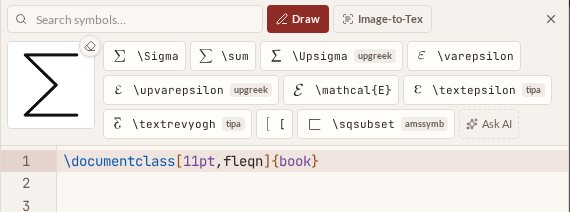
- ImprovedSymbol search, Draw and Image-to-Tex work nicely on phones
A new \smart button in the mobile quick bar opens symbol search and Draw right above the keyboard, with bigger touch targets and a larger drawing canvas. Image-to-Tex now opens as a bottom sheet on mobile — controls within thumb reach — and you can take a photo directly.
- ImprovedFormatting tray is now sticky and centred
The ⋮ tray above the editor now stays open until you toggle it off (it even remembers across reloads), appears centred over the editor, and undo/redo have moved into it.
- NewAutocomplete can insert full figure & table blocks
Typing \begin and picking figure or table now also offers a scaffolded variant with \centering, caption and label — the same block the toolbar buttons insert. The bare environment is still there when that's all you want.
- FixedAutocomplete menu now follows dark mode, and the emoji icons are replaced with tidier glyphs
- ImprovedTidier editor toolbar
Formatting tools (headings, bold, italic, lists, math, figure, table) now live in a compact "…" tray, Google-Docs style. Symbol search, draw and Image-to-Tex sit behind a new \smart button, and "go to this spot in the PDF" moved to the far right. The AI toolbar button is gone — just highlight text in the editor to rewrite with AI.
- ImprovedSymbol palette shows real rendered glyphs, a bit bigger
Search results are now the actual LaTeX renders (true Computer Modern and package outlines) at realistic sizes — no more lookalike unicode stand-ins. The search bar is tighter, and Image-to-LaTeX is now called Image-to-Tex.
- NewMissing \usepackage lines are added for you
Insert a symbol that needs a package (say \smiley from wasysym) and the \usepackage line is added to your preamble automatically, with a note. If the preamble lives in another file, you get a gentle reminder instead.
- ImprovedInserting a symbol briefly highlights the line it landed on
- ImprovedSymbol catalogue nearly tripled: 1,029 symbols, Detexify-class coverage
The palette now covers astronomy & zodiac, pictograms (wasysym, marvosym, dingbats), IPA phonetics, upright Greek, text accents & European letters, currencies, chess pieces, math functions (\lim, \det, …), extensible arrows, colon relations, and the full negated-relation set from amssymb and stmaryrd. Both keyword and semantic search cover everything — hover any result to see which package it needs.
- FixedNo more blank page after a new version ships — the tab reloads itself instead
- ImprovedSymbol search now runs on embeddings — instant and no AI model in the loop
Descriptive searches ("xor", "chemical equilibrium", "defined as") are matched against precomputed meaning-vectors for the whole catalogue, so results land in a fraction of a second. The catalogue also doubled to ~390 symbols, now covering amssymb, mathtools and other package symbols — hover any result to see which package it needs.
- ImprovedAI symbol suggestions are ~2x faster
Semantic search in the symbol palette now answers in about a second: backend checks run in parallel, the AI skips its hidden "thinking" step, and replies use a compact format.
- ImprovedSymbol palette: one smart search bar instead of category tabs
The Greek/Operators/Relations/Arrows tabs are gone. Just type what you mean — "not equal", "double integral", "squiggly equals", a command like \sqrt, or even a pasted glyph — and matches appear instantly, ranked by relevance. For fuzzier descriptions (in any language), AI suggestions appear right after the local hits, including symbols beyond the built-in set. Your snippets show up in the same search, Draw sits next to the bar, and Image-to-LaTeX moved from the toolbar into the palette.
- ImprovedAI rewrites and image-to-LaTeX are now much faster
We benchmarked our AI models head-to-head on real LaTeX tasks and tuned each feature to the fastest model that passes every quality check. Rewrites now answer in about 1–2 seconds (down from ~10), and image-to-LaTeX in about 3 (down from ~8) — with the same output quality, including keeping your document's \"o-style escapes intact.
- ImprovedAI features now wear the Samskrift mark
The generic sparkle icon is gone — everything AI in the app (rewrite, image to LaTeX, the daily-limit popup) is now marked with a small \s, drawn from the same Latin Modern letterforms as the logo.
- NewFair-use limit for AI features
The AI features (rewrite, image to LaTeX, draw-a-symbol) now share a generous free allowance of 1000 requests per person per day. If you ever hit it, a popup tells you when it resets (midnight UTC). Everything stays free.
- ImprovedImage to LaTeX: code first, preview in the background
The generated code now appears the moment the AI answers, ready to copy or insert while the test render runs in the background. If it turns out not to compile, the AI regenerates it and reloads the code (Insert and Copy pause briefly while that happens). You can also click your image or the rendered preview to see it enlarged.
- NewImage to LaTeX: live preview with an AI fix loop
The snip tool now test-compiles what the AI generates and shows the rendered result right next to your image. If the code doesn't compile, the AI reads the error log and repairs it automatically (up to two attempts) — and you can type feedback like “make the labels bigger” to iterate until it matches. Compile errors from the backup compile service now point at your real file name too, instead of an internal one.
- ImprovedSymbol palette: the close (×) button now stays pinned on the right, even when the tab row scrolls.
- ImprovedDraw-a-symbol: faster and with real previews
Recognition now runs on a much faster model and kicks off sooner after you stop sketching. Suggestions show the actual rendered LaTeX symbol instead of a Unicode look-alike, and the Draw tab now sits first in the symbol palette with My snippets right after.
- ImprovedHover the spell-check button to see which language is being checked, including what auto-detect picked.
- ImprovedCollaborator avatars: real names, click to jump
Avatars in the editor header now show your collaborator's actual name (e.g. from their Google account) instead of the first part of their email. Click an avatar to jump straight to where their cursor is in the document — and the initials no longer get text-selected on hover.
- NewThis changelog
Every ship now lands on this page with a timestamp. We often ship several times a day — bookmark it.
- FixedPermanently deleting a project now also clears its cached PDF from storage.
- NewDraw a symbol, get the command
Can't remember a command? Open the symbol palette (Ω) and pick Draw: sketch the symbol and Samskrift suggests matching LaTeX commands, with a badge when a package is required. Like Detexify, but powered by a vision AI that reads your actual handwriting.
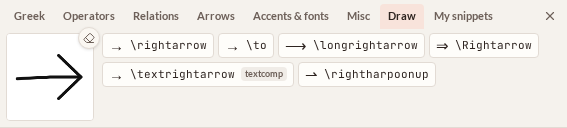
- NewOffline editing
Every document you open is mirrored into your browser's local storage. If the connection drops you just keep typing — the header shows “Offline — changes saved on this device”, and your edits survive reloads. When you're back online they merge automatically with whatever your collaborators wrote in the meantime, conflict-free, using the same engine that powers live collaboration.
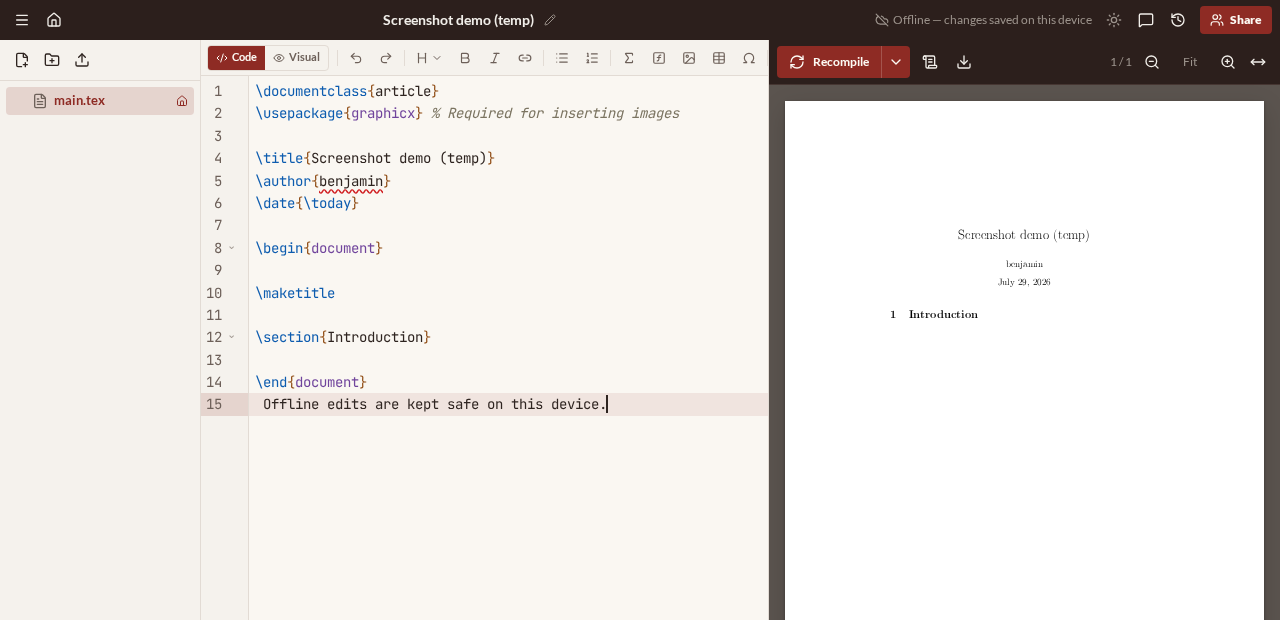
- NewImage → LaTeX
Paste or upload a picture of an equation or a table, and AI transcribes it into LaTeX (or TikZ) for you.
- NewPersonal templates
Save any project as a template from the project menu, reuse it under “My templates” when creating projects, or share it with a link.
- NewBulk actions on the dashboard: select several projects to label, archive, trash, or download as zips in one go.
- ImprovedSpell-check auto-detects your document's language (20+ dictionaries); manual override in the project menu.
- New“Forgot password?” on the login page now emails you a reset link.
- Newsamskrift.com is live
Our own domain. Old addresses redirect here automatically.
28 July 2026
- ImprovedMCP grew to 21 tools: agents can create projects from zips, make patch-style edits, browse and restore history, chat, comment, upload assets, and fetch PDFs.
- NewConnect your AI agent
Samskrift now runs an MCP server, so tools like Claude Code can read, edit, and compile your projects — with your permission, via a secure sign-in. Agent edits appear live for collaborators and in version history, marked “via MCP”. Connect with: claude mcp add --transport http samskrift https://samskrift.com/mcp
- NewEditor quality-of-life: code folding, compile-error markers in the gutter, paste images from your clipboard straight into a figure, a math symbol palette, and a Ctrl/Cmd-P quick file switcher.
- NewAnyone with a view link can download the project source as a .zip — no account needed.
- Improved\begin{ autocomplete now suggests your document's own environments, closes the braces, and inserts the matching \end automatically.
- ImprovedNew favicon: the \s mark.
- NewEvery-edit version history
History now records every single edit, not just snapshots — scrub back through a document and restore any point, without losing anyone's work.
- NewSelf-hosted compile server support, for faster and private builds.
- NewMiss Överlev? Switch back to the legacy theme in account settings.
- NewA proper “Add files” flow
Drop several files at once, rename them before saving, pick a destination folder — and get a clear warning before anything is overwritten.
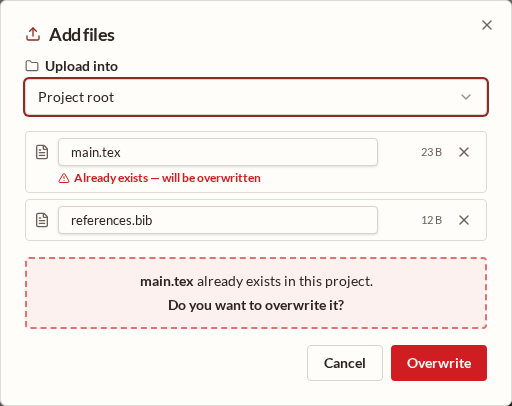
- NewÖverlev is now Samskrift
New name, new logo, new typography — same editor. Samskrift ≈ “writing together”.
- SecurityHardening pass: live-editing channels restricted to project members, stricter share-link rules, and leaked-password protection at sign-up.
27 July 2026
- FixedDocuments using certain packages failed to compile; the compiler now falls back between compile services automatically.
- ImprovedPolish round: better mobile dashboard, visible cursor in dark mode, cursor position restored on reload, automatic first compile when a project opens, and Vim's u / :w behaving properly.
- NewOrganise with labels, duplicate projects with “Copy project”, and navigate long documents with the new outline tree.
- NewPower-user batch
Vim mode, import from Overleaf (zip or link), autocomplete for \ref, \cite, \includegraphics and \input, jump between source and PDF with Ctrl/Cmd-J, view links that work without an account, a unified login page, AI “try fix” on compile errors, and abortable compiles.
- NewDark mode — plus collaborators by email with editor/viewer roles (no email is sent yet; share the link yourself).
- NewDrag files from your computer straight into the file tree to upload them.
- ImprovedThe compiled PDF survives page reloads — no recompile needed.
- NewAI rewrite (opt-in): select text and tell the AI how to change it. Enable it in account settings.
- NewShare by link with separate editor and viewer links, plus Google sign-in.
- ImprovedButtery pinch-to-zoom on the PDF preview (trackpad and touch).
- NewParity batch
Rebuilt PDF viewer with steady scrolling on mobile, spell-check, track changes, review comments, project-wide search, visual math preview, and SyncTeX source↔PDF mapping.
- ImprovedNicer editing on phones: compact top bar, editor/PDF/chat tabs, and a LaTeX quick-insert row.
- NewHello, world
First release (as Överlev): a real-time collaborative LaTeX editor — live cursors, shared projects, instant PDF preview. Free.
Samskrift is free to use. Create an account or learn more.